Snippet Library
The snippet library provides insertable GLSL building blocks organized by category. Click any snippet to insert it into your active shader file.
Opening
- Toolbar menu → Snippet Library
- Command palette → Shader Studio: Open Snippet Library
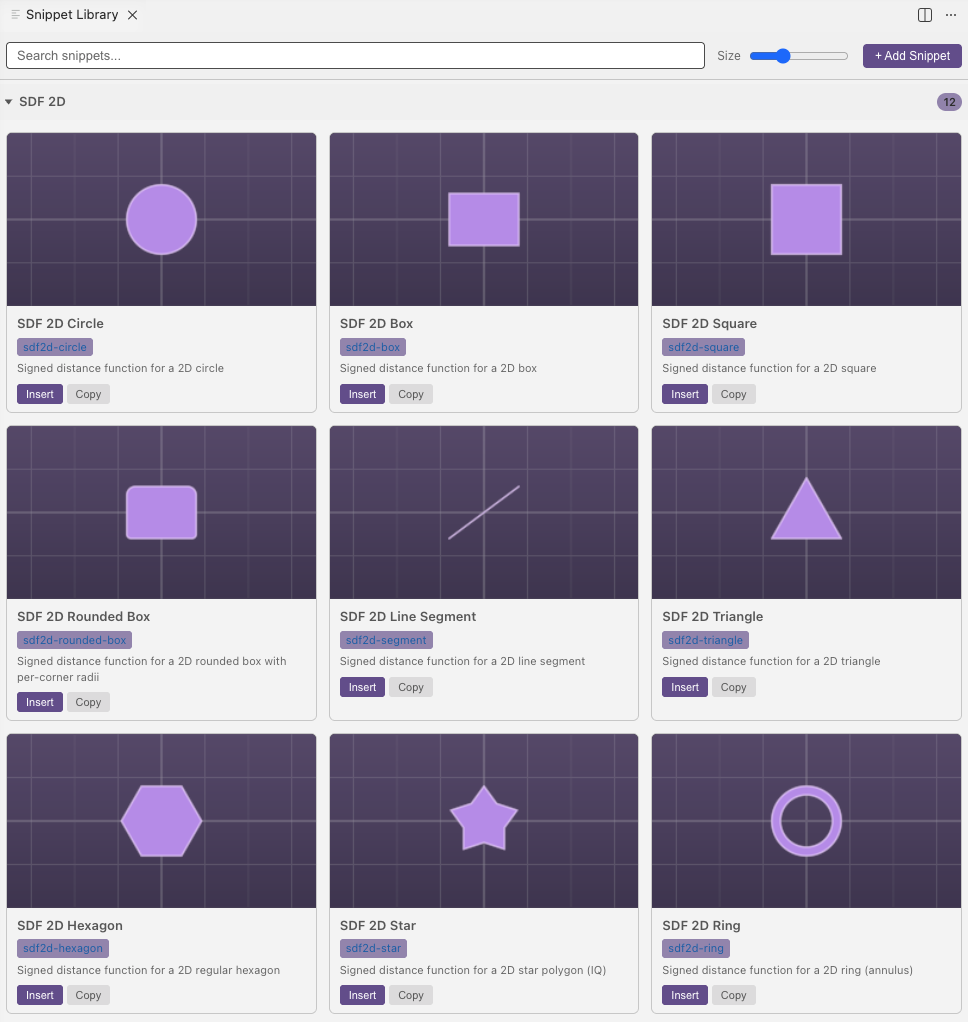
Built-in Snippets
SDF 2D (Signed Distance Functions)
2D shape distance functions for use in fragment shaders:
| Snippet | Description |
|---|---|
sdf2d-circle |
Circle distance field |
sdf2d-box |
Axis-aligned box |
sdf2d-square |
Square (equal-sided box) |
sdf2d-rounded-box |
Box with rounded corners |
sdf2d-segment |
Line segment |
sdf2d-triangle |
Triangle |
sdf2d-hexagon |
Regular hexagon |
sdf2d-star |
Star shape |
sdf2d-ring |
Ring (annulus) |
sdf2d-arc |
Arc segment |
sdf2d-vesica |
Vesica piscis |
sdf2d-ellipse |
Ellipse |
Each snippet includes a function definition, description, and example call.
SDF 3D (Signed Distance Functions)
3D shape distance functions for raymarching:
| Snippet | Description |
|---|---|
sdf3d-sphere |
Sphere |
sdf3d-box |
Axis-aligned box |
sdf3d-rounded-box |
Rounded box |
sdf3d-torus |
Torus (donut) |
sdf3d-cylinder |
Cylinder |
sdf3d-cone |
Cone |
sdf3d-capsule |
Capsule (line segment with radius) |
sdf3d-plane |
Infinite plane |
Each 3D snippet includes a full example with raymarching setup.
Coordinates
Coordinate transformation utilities:
| Snippet | Description |
|---|---|
coord-polar |
Cartesian to polar conversion |
coord-polar-inv |
Polar to cartesian conversion |
coord-pmod |
Polar modular repetition (radial symmetry) |
Math
| Snippet | Description |
|---|---|
math-pi |
#define PI 3.14159265359 |
Snippet Details
Each snippet provides:
- Prefix — autocomplete trigger text
- Description — what the snippet does
- Body — the code that gets inserted
- Call — example usage of the function
- Example — full context code showing the snippet in use
Custom Snippets
You can create your own snippets stored in .vscode/glsl-snippets.code-snippets in your workspace.
In the snippet library UI:
- Create — fill in the form with name, prefix, body, description, call example, and code example
- Edit — update existing custom snippets
- Delete — remove custom snippets
Inserting
Click a snippet to insert it at the cursor position in your active GLSL editor. If the snippet library panel has focus, it inserts into the last active editor. You can also use them as regular VS Code snippets — type the prefix in the editor and press Tab to insert.
Enabling
Snippets are enabled by default. If the library is missing, check that shader-studio.enableSnippets is enabled in settings and reload the VS Code window.
Next
Performance — cap the frame rate and monitor rendering performance