Panel Layout
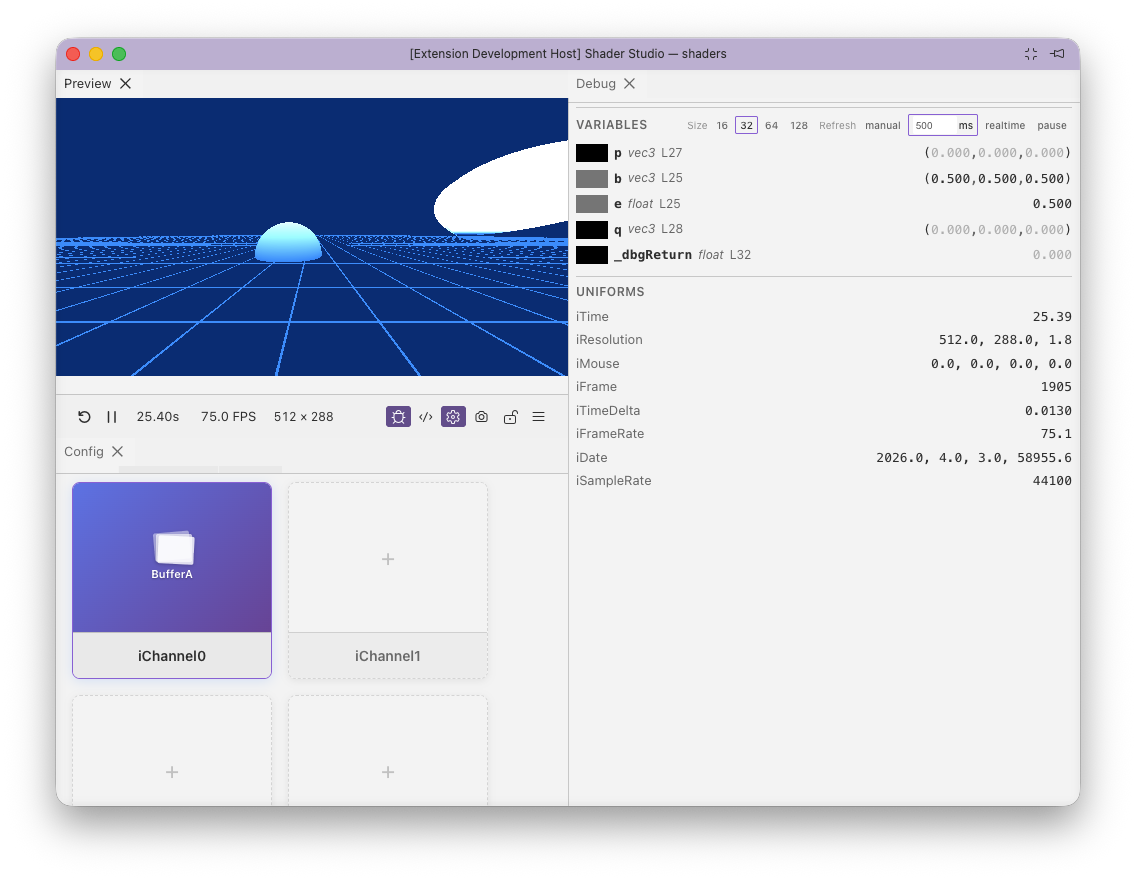
Shader Studio uses a dockable panel system. Panels (Preview, Debug, Config, Performance) can be rearranged:
- Drag a tab header to move a panel to a different group
- Drag to an edge (left, right, top, bottom) of an existing group to split it
- Drag the sash (the divider between panels) to resize
- Tab headers auto-hide when only one panel is in a group. To view the tabs again, move your mouse near the top of the panel and they will appear
The current panel arrangement is tracked while you work, but it is only written to the active layout profile when you choose Menu → Layout → Save current layout.
Layout profiles
Layout profiles let you save and switch between named panel arrangements. Each profile stores:
- Panel layout (which panels are open, their sizes and positions)
- Config panel visibility
- Debug panel visibility and settings
- Performance panel visibility
- Theme (in non-VS Code environments)
Open the profile controls from Menu → Layout. The layout submenu shows the active profile, saved profiles, save/restore/reset actions, and Manage profiles.
Managing profiles
The Manage Profiles modal lists all saved profiles. The active profile is highlighted.
- Click a profile name to switch to it immediately
- Drag the grip handle (left edge of each row) to reorder profiles
- Rename (pencil icon) — click to edit the name inline; press Enter to confirm or Escape to cancel
- Save to profile (disk icon, active profile only) — overwrites the profile with the current layout; shows an "Are you sure?" confirmation before saving
- Delete (trash icon) — removes the profile; disabled when only one profile exists
At the bottom of the modal, enter a name and click Save to create a new profile from the current layout.
Saving vs switching
Switching profiles loads the saved panel arrangement. Your current layout is not automatically saved when you switch — unsaved changes are discarded. To preserve your current layout, save it first using Menu → Layout → Save current layout or create a new profile.
Restoring or resetting layout
Use Menu → Layout → Restore Saved Layout to discard unsaved changes and reload the active profile's saved layout. If the active profile has no saved layout yet, Shader Studio falls back to the default arrangement.
Use Menu → Layout → Reset to Default to rebuild the default panel arrangement directly. This does not overwrite the active profile until you save the current layout.
Profile storage
Profiles are stored in .shader-studio/profiles/ alongside your shader project:
.shader-studio/
  profiles/
    index.json         # profile list and active profile ID
    default.json       # per-profile layout data
    wide-editor.json
    ...
The index.json file records the profile order and which profile is active. Each profile file stores a full snapshot of panel state and layout.
Default profile
Every new workspace starts with a single "Default" profile. It cannot be deleted until a second profile exists.
Next
Locking — keep the preview pinned to a specific shader