Parameters & Loops
When debugging inside a helper function or a loop, extra controls appear in the debug panel to help you control execution.
Parameters
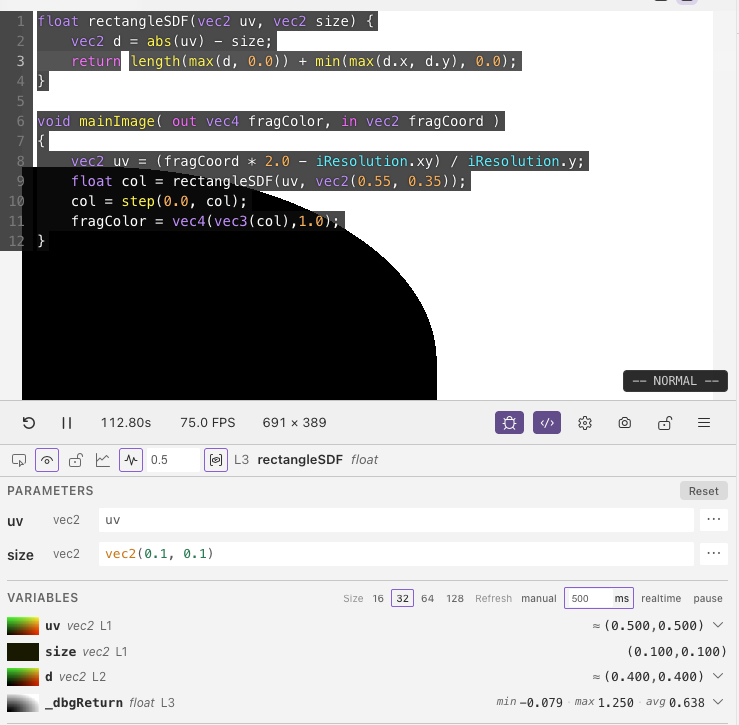
When your cursor is inside a helper function (not mainImage), the Parameters section lets you choose what values are passed to the function's arguments.
Each parameter can be set to:
- UV — map the parameter to screen coordinates (default for spatial parameters)
- Centered UV — aspect-ratio-corrected coordinates centred on the screen
- Custom — enter your own constant value, with sliders, colour pickers, or number inputs depending on the type
- Preset — use built-in expressions like
iTime,sin(iTime), oriFrame
Parameter values are cleared when you switch to a different function.
Loops
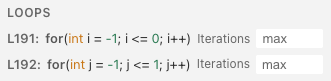
When your cursor is inside a loop, the Loops section lets you cap the number of iterations. This is useful when debugging expensive loops — like raymarching with hundreds of steps — so the shader stays responsive.
Set the max iterations to a low number (like 5–20) to see early behaviour, or leave it empty to let the loop run fully. Each loop in a nested set can be capped independently.
Next
Normalization & Step — remap value ranges and apply binary thresholds