Options Menu
Click the Menu button () in the toolbar to access shader actions:
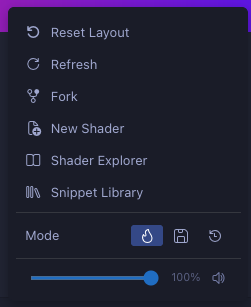
| Action | Description |
|---|---|
| Reset Layout | Reset docked panels to their default positions |
| Refresh | Force recompile and re-render |
| Fork | Duplicate the current shader to a new file |
| New Shader | Create a new shader from the default template |
| Shader Explorer | Browse shaders in your workspace |
| Snippet Library | Insert GLSL building blocks |
| Mode | Choose between Hot (compile on every change), Save (compile on file save), or Manual (compile on demand). See Compile Modes. |
| / Volume | Global volume slider and mute toggle for all audio channel inputs |